> For the complete documentation index, see [llms.txt](https://eu.support.backpack.exchange/llms.txt). Markdown versions of documentation pages are available by appending `.md` to page URLs; this page is available as [Markdown](https://eu.support.backpack.exchange/exchange/login-and-security/i-suspect-unauthorized-access-to-my-account.md).
# I suspect unauthorized access to my account
If you believe someone has accessed your Backpack Exchange account without your permission, follow these urgent steps.
## Here's what to do:
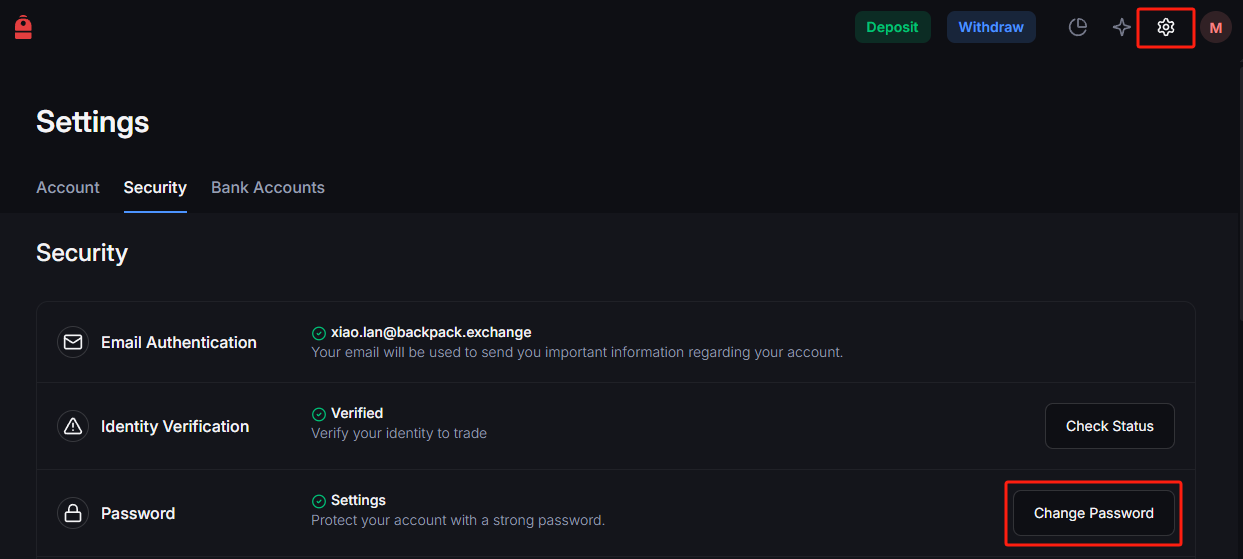
### **1) Change Your Password Immediately:**
* Log in and navigate to 'Settings' to update your password with a strong, unique combination.
* [**Visit Backpack Exchange here.**](https://eu.backpack.exchange/)
### **2) Enable Two-Factor Authentication (2FA):**
* If not active, head to 'Security Settings' to set up 2FA using a reliable app like Google Authenticator.
### **3) Review Account Activity:**
* Check your transaction history for any unfamiliar actions or transactions.
* Contact us at [**support@eu.backpack.exchange**](mailto:support@eu.backpack.exchange) detailing your concerns immediately. Include any unusual activity you've noticed.
***
## Recognize and avoid phishing attempts
To safeguard your Backpack EU account, it's crucial to recognize and prevent phishing attempts follow these steps.
### **1) Verify the URL**
* Always ensure you're accessing the official Backpack EU site: [https://eu.backpack.exchange](https://eu.backpack.exchange/)
* Double-check the URL, especially before entering any credentials.
**Note:** [**Official links to all Backpack Exchange and Backpack Wallet channels are located here**](https://backpack.app)
### **2) Beware of unsolicited communications**
* Suspicious emails or messages claiming to be from Backpack EU should be treated with caution. We will never ask for your password or 2FA codes under any circumstances. If anyone asks you to provide your password or 2FA code, they are a scammer.
### **3) Examine email senders**
* Double-check the sender's email address. Phishers may use addresses that look similar but have small alterations.
### **4) Avoid clicking on suspicious links**
* Do not click on links or download attachments from unknown or unverified sources. Hover over links to view their destination URL before clicking.
### **5) Report suspicious activity**
* If you encounter anything suspicious related to Backpack EU, contact our support at immediately.
**Your online safety is vital.**
By staying informed and cautious, you can protect your account and assets from potential threats.
---
# Agent Instructions
This documentation is published with GitBook. GitBook is the documentation platform designed so that both humans and AI agents can read, navigate, and reason over technical content effectively. Learn more at gitbook.com.
## Querying This Documentation
If you need additional information that is not directly available in this page, you can query the documentation dynamically by asking a question.
Perform an HTTP GET request on the current page URL with the `ask` query parameter, and the optional `goal` query parameter:
```
GET https://eu.support.backpack.exchange/exchange/login-and-security/i-suspect-unauthorized-access-to-my-account.md?ask=&goal=
```
`ask` is the immediate question: it should be specific, self-contained, and written in natural language.
`goal` is optional and describes the broader end goal you are ultimately trying to accomplish on behalf of the user. GitBook uses it to tailor the answer towards what is most useful for that goal.
The response will contain a direct answer to the question and relevant excerpts and sources from the documentation.
Use this mechanism when the answer is not explicitly present in the current page, you need clarification or additional context, or you want to retrieve related documentation sections.